CVE-2015-9235 - JWT Key Confusion Exploit
Note from the Author: Welcome to the second post in my CVE of the week series! This post was a bit later because I've been studying for exams this week. Anyways, this post covers not just one CVE, but a vulnerability class that keeps recurring (CWE-347 (Improper Verification of Cryptographic Signature)). It was first researched by Canadian security researcher Tim McLean in 2015. However, being older than a decade does not mean it’s irrelevant… For example: CVE-2026-22817 (affecting the Hono web framework) was disclosed this year. But, for the sake of this post, I’m labeling it with the original CVE assigned to the JWT vulnerability: CVE-2015-9235.
As always, there’s an accompanying github repo for this week’s CVE, if you’re interested in more details about the configs and whatnot: github.com/paperclipsvinny/cve-of-the-week
At-A-Glance
CVE ID: CVE-2015-9235
Description: JWT Algorithm Confusion / Key Confusion Attack
CWE: CWE-347 – Improper Verification of Cryptographic Signature
Disclosed: March 31, 2015
Researcher: Tim McLean
Severity: 7.5 (High)
Exploit Type: Authentication Bypass
Software Affected: JWT libraries that trust the "alg" header without enforcement:
node-jsonwebtoken (< 4.2.2), pyjwt, namshi/jose, php-jwt, jsjwt
Notable Victims:
2023: CVE-2023-48223 – fast-jwt (< 3.3.2)
2026: CVE-2026-22817 – Hono framework (< 4.11.4), CVSS 8.2
Background
Background: How JWT Algorithm Confusion Works:
To understand how a JSON Web Token (JWT) algorithm confusion attack occurs, you first need to understand how JWTs work. Each token has three parts, encoded in base64, and separated by a dot. Those three parts are:
1 - Header
2 - Payload/contents
3 - signature
The Header contains information to identify the rest of the token. First, it identifies itself as a JWT in the ”typ”: “JWT” field, and second, it identifies which algorithm it’s signed with in the (alg) field. Where this comes into play is when you have a server that expects a token to use RS256 (which is asymmetric), but trusts the token’s alg value instead of enforcing what it expects. Thus, an attacker can modify the JWT token to a different algorithm, such as HS256, which is symmetric, and sign it with the public key provided for RS256 signing.
Because the server blindly trusts the modified alg value, it switches to use HS256 verification with the key it has available (the same RS256 public key). Thus, the server verifies the fake, forged token (signed by the attacker) and validates the attacker.
By the way, I was inspired to explore this attack vector after seeing a similar challenge on UTCTF 2026.
Scope & Authorization
This testing was conducted on OWASP Juice Shop, a vulnerable web app expressly designed for security testing. The application was hosted on an offline cyber range, for educational and defensive security research purposes only. I conducted this testing ethically, with express authorization.
Inspiration (A CTF Tangent)
The inspiring CTF challenge I mentioned earlier had a challenge which looked something like this: The UTCTF challenge used JWE encryption; the token was encrypted with RSA-OAEP-256 and A256GCM. The solution involved using the exposed public key to encrypt a forged payload. While researching that, I discovered a related but different attack class: JWT algorithm confusion, which targets signed tokens rather than encrypted ones. Either way, I wanted to include the CTF notes from the challenge, just for fun. First, you were given a banking website with ‘state of the art’ security:
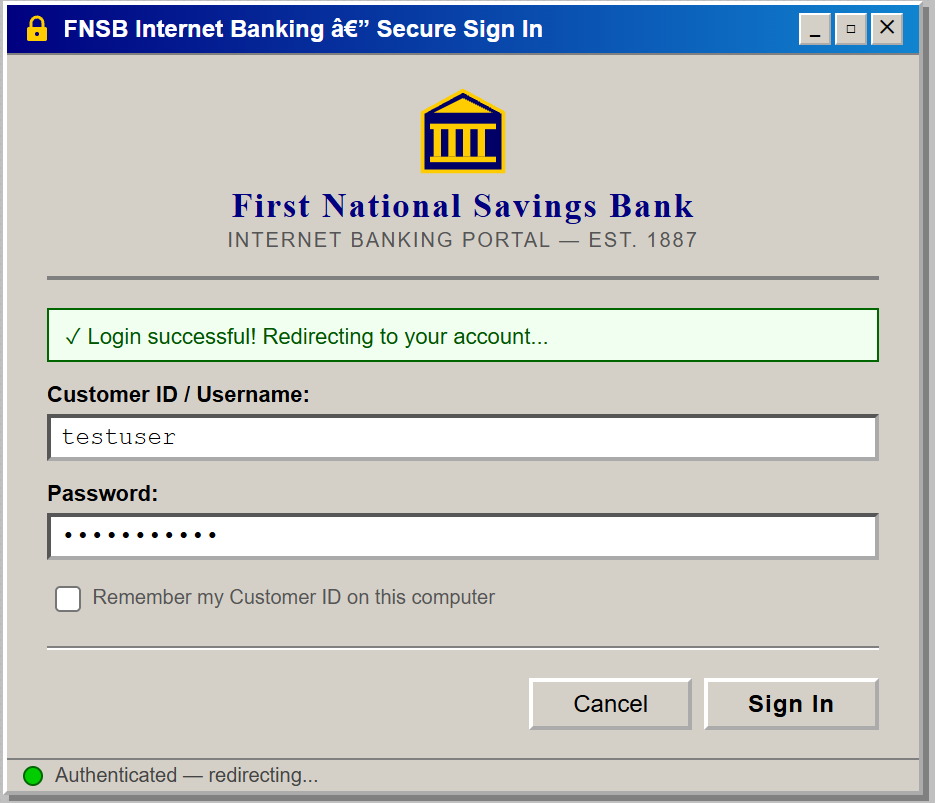
The website operates on JWE with a nested JWT the first part of the cookie is the same string and is encoded in base64:{"cty":"JWT","enc":"A256GCM","alg":"RSA-OAEP-256"}
After enumerating the website further, I found the /resources/ endpoint, which contained a public key at /key.pem.
Then, the solution to the challenge was to use the key to encrypt a token to get the flag. Like I said, it was while doing research for this challenge that I learned about JWT Algorithm Confusion.
Lab Setup

I had a local version of juice shop running on a docker container on my Ubuntu 20.04 LTS server. I also installed Ticarpi’s jwt_tool project from github, which helped with crafting forged JWT payloads.
Juice shop: 192.168.20.50:80 (mapped to docker container on 3000)
Attacker: 192.168.10.50 (Kali Lite)
Initial Recon
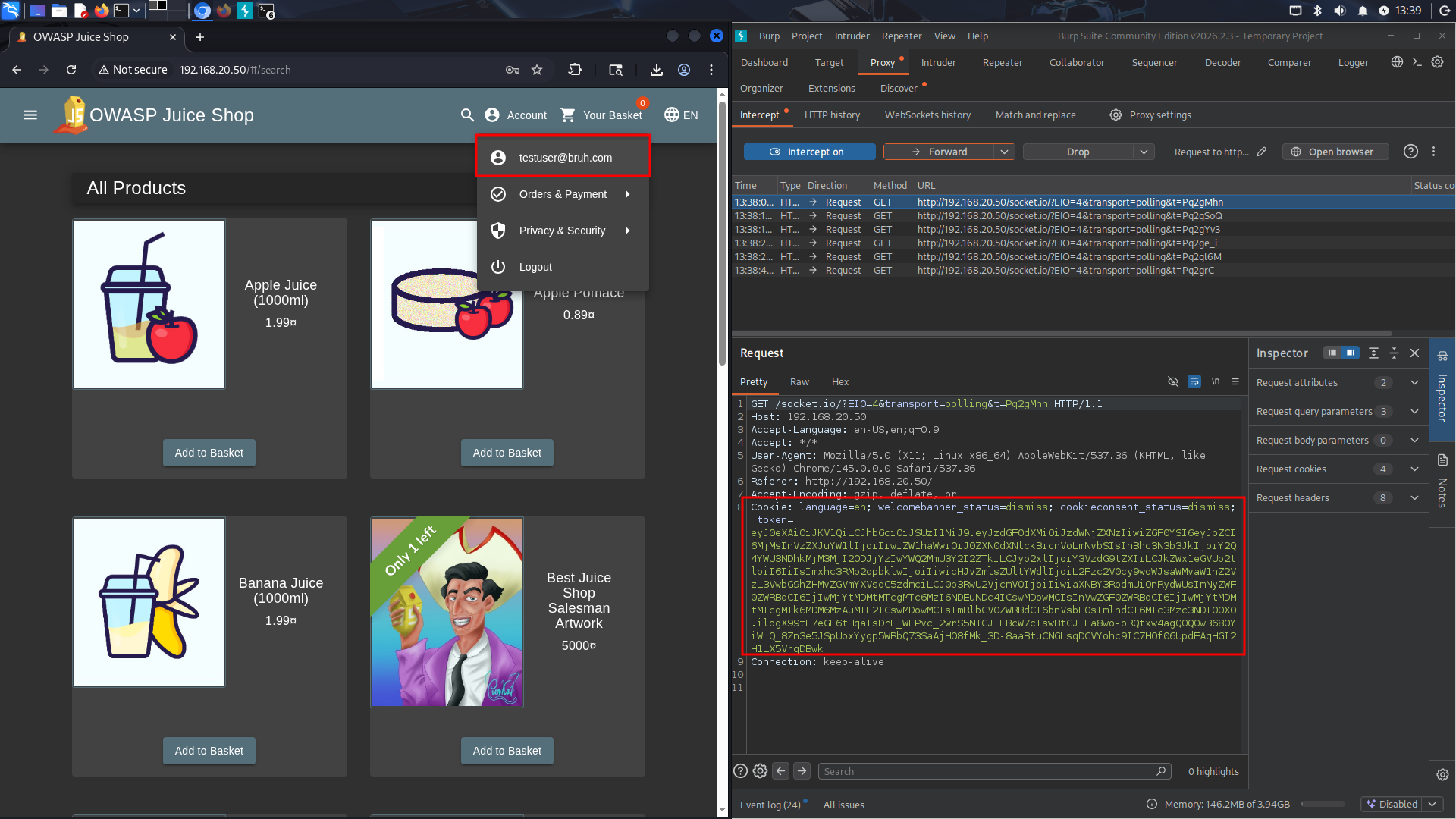
The first step in my methodology was to create a legitimate user (testuser@bruh.com). After I was logged in as that user, I captured the cookies given in Burpsuite, and saved them for later. I then moved to finding the public RSA key we could use for this attack.
Initial enumeration failed because standard gobuster returned false positives — Juice Shop returns 200 for all pages (SPA behavior). I then switched to using content length as a filter for illegitimate pages. This led to some good endpoints but did not find anything that looks related to encryption keys. I also tried a more manual search in the JavaScript source at this time, to find any references that directory bruteforcing would miss, but came up empty (it’s not being referenced client side). Thus, I decided to retry fuzzing but with some common key endpoints, using a list I had AI generate for me.
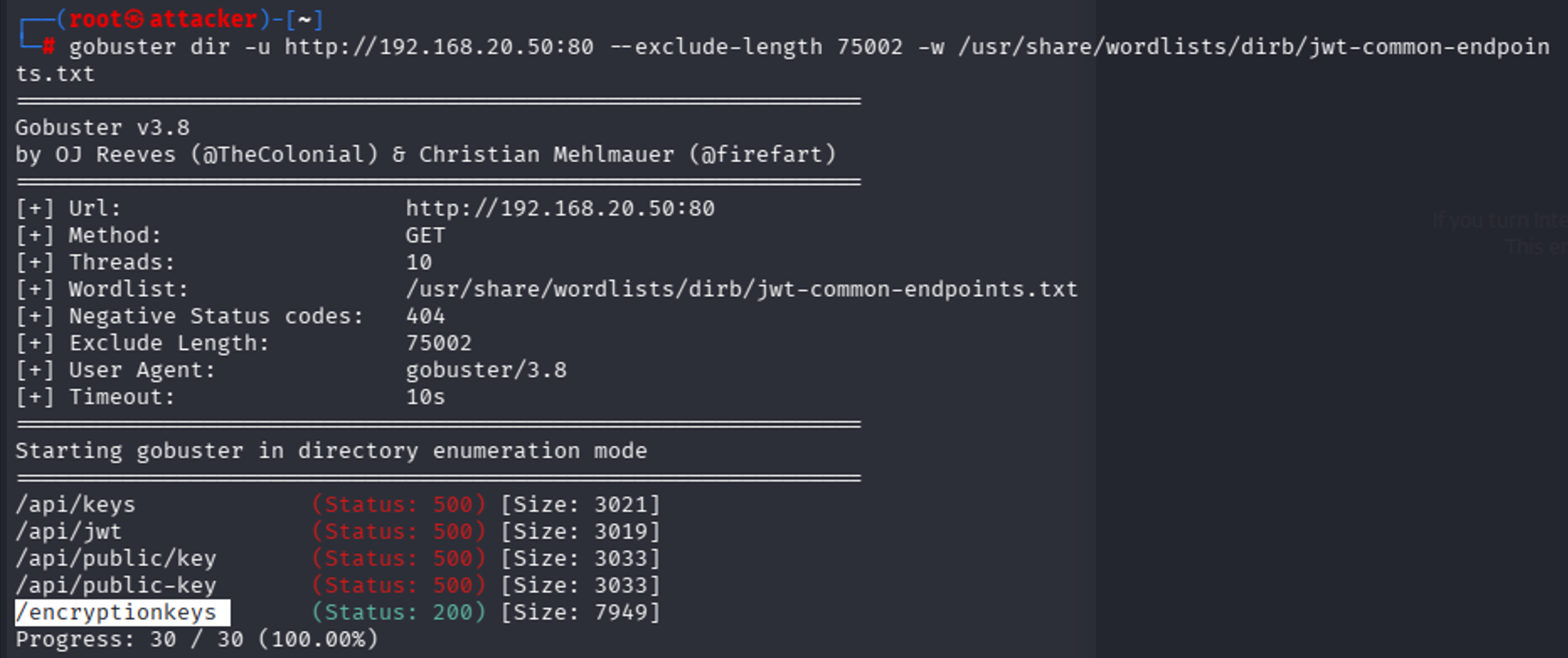
I think all the API ones false positive just because we get a 500 error from anything from the API endpoint, but we can also see there’s a /encryptionkeys endpoint.
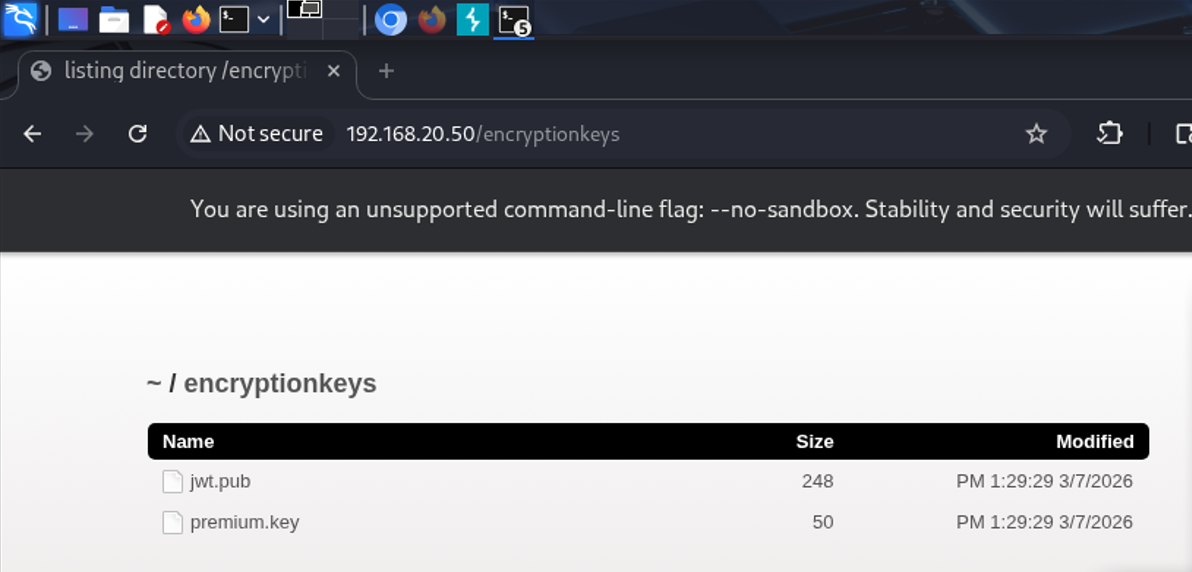
Upon visiting it, we see there’s two keys, one of which is an RSA Key. Exactly what we’re looking for. The other is for some other challenge.
Taking our cookie from earlier, I spent time modifying the fields in various ways, each time signing it with the RSA key we found:
Jwt_tool.py <token>
I started with changing ID to 1, and then role: admin, but figured maybe it authenticated based on email or username, so I went into recon to find the email, finding it quickly in a review: email: admin@juice-sh.op. I was guessing the username was probably admin. Find admin email:
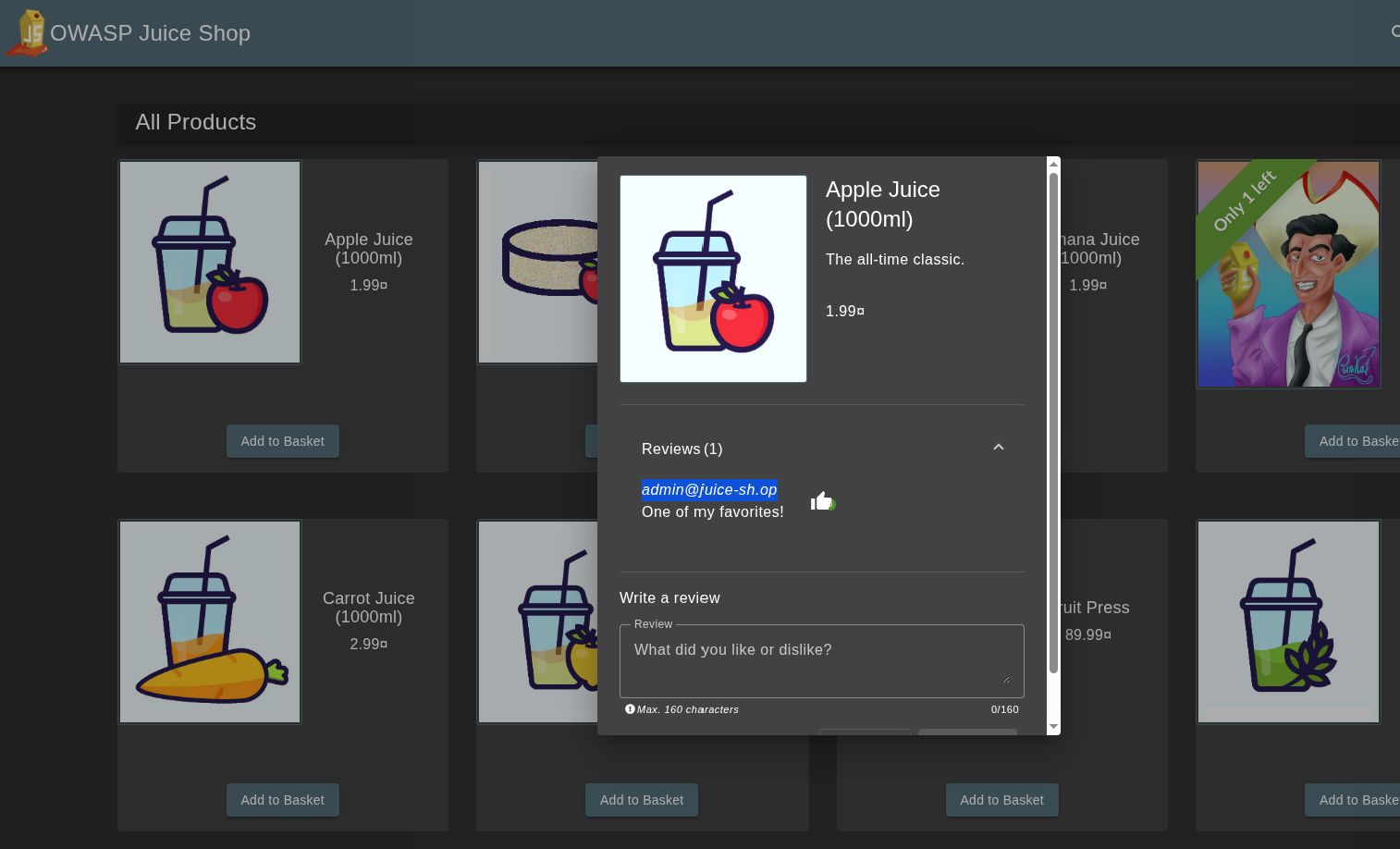
One problem I ran into while modifying values was that originally I had been appending new payload values instead of editing the data field values. Also, I had to make sure I was signing it each time. Unfortunately, even with all this trial and error, the fields didn't match the real admin token exactly. At this point, I used a SQLi in the admin field to reverse engineer what the real token looked like, because I spent a LOT of time trying to get the fields right.
Logged in with: admin@juice-sh.op’-- (comments out the password field) to find the token structure. No harm in saving some time as long as the fundamental attack works.
I spotted the difference! As expected, most of my values were correct, but the username was empty in the legitimate token, which is what was causing the token to fail.
Sidenote: Philosophically speaking, is it a “legitimate token” if it was issued by the server but obtained with an SQLi?
Anyways, I then logged out, cleared cookies, and re-signed the original testuser@bruh.com cookie (with modifications to the role, id, username, and email, before signing it with the public key). To my satisfaction, this worked!
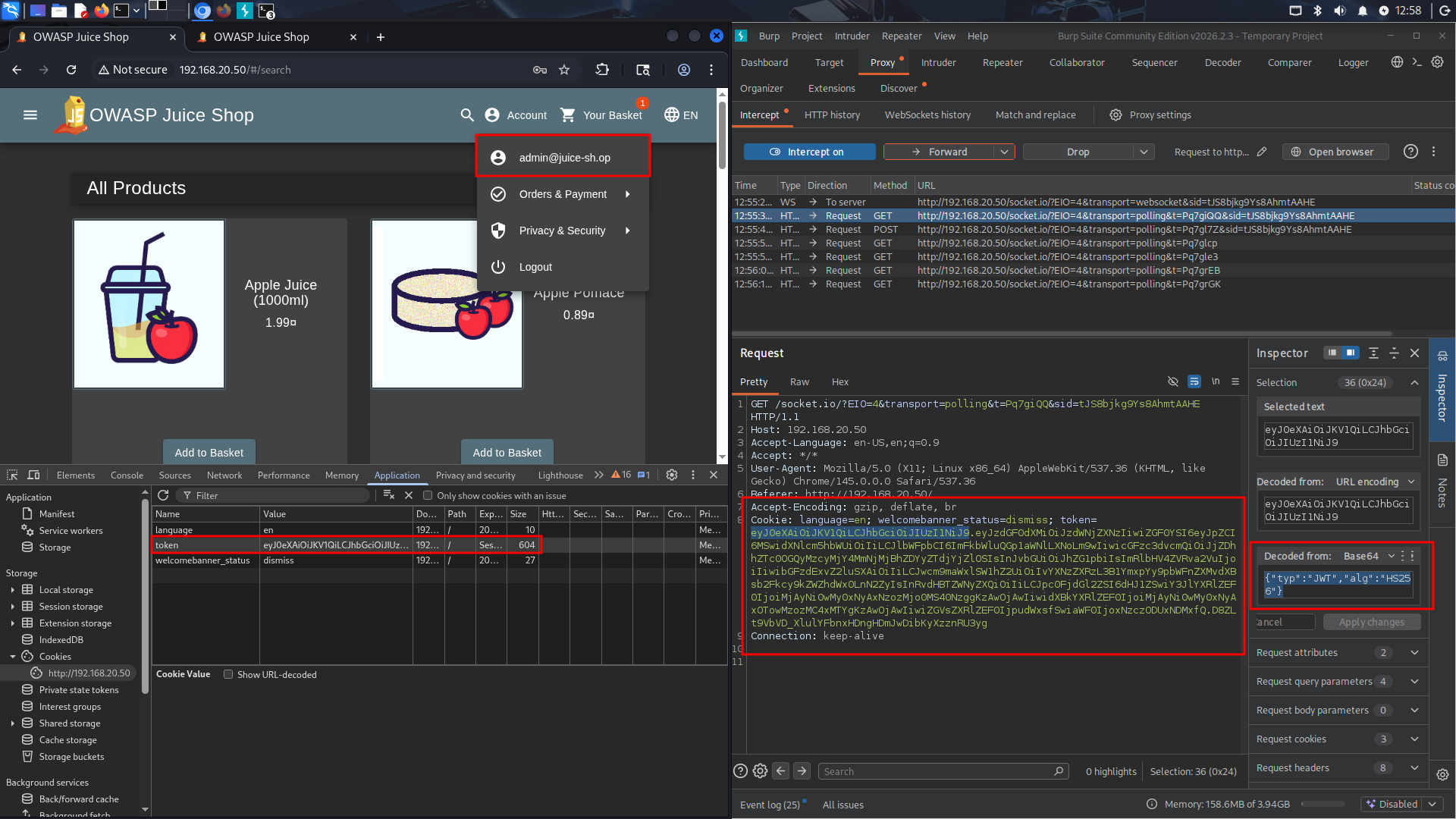
You can see it’s different from the original admin token, it’s now signed hs256 and with the public key, and also the md5 password hash and profile image are unchanged from the originally generated testuser@bruh.com cookie.
Remediation:
The easiest way to remediate against this attack is to not allow the ALG to be chosen dynamically from the token. If your application absolutely requires support for more than one type of algorithm, then at least use different keys. For example in Hono’s remediation: Before version 4.11.4, alg was optional, and was a trusted header:
app.use(
  '/auth/*',
  jwk({
    jwks_uri: 'https://example.com/.well-known/jwks.json',
    // alg was optional
  })
)
Compared to their Patched configuration:
import { jwk } from 'hono/jwk'

app.use(
  '/auth/*',
  jwk({
    jwks_uri: 'https://example.com/.well-known/jwks.json',
    alg: ['RS256'], // required: explicit asymmetric algorithm allowlist
  })
)
Source: https://github.com/honojs/hono/security/advisories/GHSA-3vhc-576x-3qv4
The good news and bad news: it was hard enough for me to directly replicate the fields for a valid token for a specific user in my manual testing. However, this absolutely does not mean that it’s not possible for more advanced attackers. It might take some API enumeration, or brute forcing, but a motivated attacker could definitely identify valid target accounts to forge tokens from. Strong cryptography is useless if you let the attacker define how it’s used. Thanks for reading! </>
References & Resources
- cool @nahamsec video from about 8 months ago, talking about this same vulnerability class and how it landed him a 10k bug bounty: https://www.youtube.com/watch?v=0R3xHx7fPUM
- Critical Vulnerabilities in JSON Web Token Libraries (published by Tim McLean himself): https://auth0.com/blog/critical-vulnerabilities-in-json-web-token-libraries/
- UTCTF2026 Web Writeups (Not mine but for any CTF'ers out there): https://gist.github.com/Panya/ddec230a660f0327da4d8e8c3fda0153
- jwt_tool — JWT Testing Toolkit (GitHub): https://github.com/ticarpi/jwt_tool
- OWASP Juice Shop — (GitHub): https://github.com/juice-shop/juice-shop